In the development of enterprise dashboards, managing data tables is often one of the most complex challenges. In one of my test projects, the GridContainer.tsx and Grid.tsx components represent an excellent example of how to leverage the power of React Table (v7) to create a flexible, powerful, and highly customizable interface.
The “Headless” Approach
The peculiarity of react-table is its being a headless library. It doesn’t provide UI components (no pre-packaged <table> tags), but it provides hooks that manage all the state logic: sorting, pagination, expansion, and selection.
In the test, I tried to use an architecture with the Container/Presenter pattern:
- GridContainer: The “Brain”. Decides which columns to show, how to format links, and whether to activate pagination.
- Grid: The “Muscle”. Takes the instructions and generates the HTML tags, manages the CSS, and ensures that the user physically sees the sorting icons or expanded rows.
GridContainer Component
In GridContainer.tsx, we use the main useTable hook combining it with several plugins:
const gridConfig = useTable(
    gridData,
    useSortBy,    // Manages column sorting
    useExpanded,  // Manages row expansion
    !!withPagination && usePagination // Manages pagination (optional)
);
This modularity allows loading only the necessary code, keeping the component lightweight.
The “Trick” of Column Pre-processing
One of the most interesting features of our GridContainer is how it transforms a “flat” data definition into a rich UI. Before passing the columns to react-table, the component performs a dynamic mapping:
tableData.columns = tableData.columns.map((el) => {
    // 1. Dynamic expansion injection
    if (!!subRow && !!el.NeedCellExpand) {
        el.Cell = ({ row }) => (
            <span {...row.getToggleRowExpandedProps()}>
                {row.isExpanded ? '👇' : '👉'}
            </span>
        );
    }
    // 2. Conditional rendering of links and badges
    if (!!el.NeedCellLink) {
        el.Cell = ({ row }) => (
            <ButtonLink link={...} textButton={row.original[el.NeedCellLink]} />
        );
    }
    return el;
});
Particularities: Row Expansion & Custom Cells
- Row Expansion: Thanks to
useExpanded, we can make rows interactive. TheGrid.tsxcomponent receives arenderSubElementfunction that allows showing additional details under the main row without cluttering the parent table structure. - Polymorphic Cells: Instead of just showing text, the component transforms data into
ButtonLink,Badge, or icons based on specific flags likeNeedMultipleLinkorNeedCellLink.
Evolution: Towards TanStack Table v8
The React world moves fast, and react-table has evolved into TanStack Table v8. If we were to update our component today, here are the main differences we would face:
- TypeScript First: While v7 uses plugins as hook arguments, v8 was completely rewritten in TS. Column definition would become more structured through a
ColumnHelper. - State Management: In v8, state is more explicit. Plugins are no longer passed as hooks, but “features” are enabled directly in the
useReactTableconfiguration object. - Extreme Modularity: v8 is even lighter and completely removes the “plugin” concept in favor of a declarative configuration.
Refactoring Example (v7 vs v8)
Today (v7):
useTable({ columns, data }, useSortBy, usePagination)Tomorrow (v8):
useReactTable({
  data,
  columns,
  getCoreRowModel: getCoreRowModel(),
  getSortedRowModel: getSortedRowModel(), // Explicit sorting feature
  getPaginationRowModel: getPaginationRowModel(), // Pagination feature
})
Grid Component
The Grid.tsx component acts as the Presentation Layer (or visualization layer) of the system. While GridContainer handles business logic and plugin configuration, Grid has the task of transforming the data processed by react-table into actual HTML code.
Here is what it specifically handles:
1. Rendering the <table> HTML Structure
This is where the “marriage” between headless logic and the DOM happens. The component applies the so-called prop getters provided by react-table to ensure the table is accessible and correctly structured:
<table {...getTableProps()} className={css['grid--bordered']}>
    <thead>{/* ... */}</thead>
    <tbody {...getTableBodyProps()}>{/* ... */}</tbody>
</table>
2. Sorting Interface Management
Grid.tsx takes care of visually showing the sorting state in column headers, adding visual indicators (arrows) based on the isSorted and isSortedDesc state:
<span>
    {column.isSorted
        ? column.isSortedDesc
            ? ' 🔽'
            : ' 🔼'
        : ''}
</span>
3. Row Life Cycle (prepareRow)
A critical task is executing prepareRow(row). In react-table, rows are lazy-loaded; Grid prepares each row just before rendering, calculating the styles and properties needed for the cells.
4. Rendering Sub-Rows (Expanded Rows)
The component implements visualization logic for additional details. If a row is expandable and the isExpanded state is active, Grid.tsx injects an extra row into the <tbody> to render the renderSubElement:
{row.isExpanded ? (
    <tr>
        <td colSpan={visibleColumns.length}>
            {renderSubElement({ row, ...otherInfo })}
        </td>
    </tr>
) : null}
5. Debugging and Transparency
It includes a debug mode that allows viewing the internal JSON state of the expansion, very useful during development to understand how the react-table engine is reacting to user interactions.
Visual Analysis
Here is a description of the data flow from the source to the final rendering in the DOM, highlighting the central role of the TanStack react-table dependency.
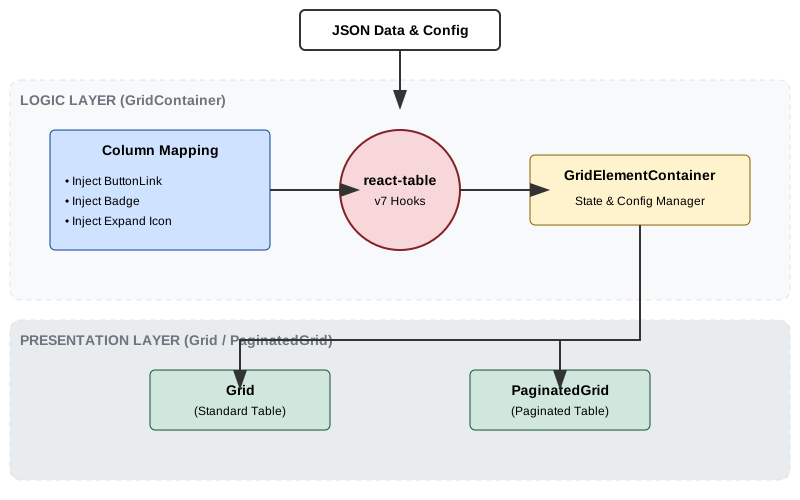
1. The Transformer (GridContainer)
GridContainer.tsx receives raw data. Even before the library comes into play, it performs column “enrichment”. If a column has the NeedCellLink flag, a Cell function is injected that renders a React component (ButtonLink). This is a powerful pattern: data decides its appearance.
2. The Engine (react-table)
In GridElementContainer, we call the react-table hooks. This is where the magic happens: the library takes our enriched columns and data, returning a gridConfig object that contains:
- State (who is expanded? which page are we looking at?).
- “Prop Getters” (functions that generate the correct HTML attributes).
3. The Executors (Grid & PaginatedGrid)
These components are “dumb” from a logic point of view but “expert” in layout. They receive everything they need from gridConfig and handle:
- Iterating over rows and cells.
- Calling
prepareRow(necessary forreact-tablev7). - Managing conditional rendering of sub-rows (
renderSubElement).
Why this separation?
- Testability: You can test the mapping logic in
GridContainerseparately from the layout. - Maintainability: If you decide to change the table design (e.g., move from a bordered table to a “striped” one), you only need to modify
Grid.tsx, without touching the data logic. - Performance: By using
useMemoinGridElementContainer, we avoid heavyreact-tablerecalculations on every parent render.
Conclusion
The implementation of tests with Grid.tsx and GridContainer.tsx with a Container/Presenter architecture demonstrates how a plugin-composition approach can solve complex data visualization scenarios. Moving to v8 would bring greater robustness thanks to TypeScript’s type system, while keeping the “headless” philosophy that makes this component so versatile.
Recommended Optimizations
- Migration to
@tanstack/react-table: To achieve better performance and a superior developer experience thanks to static types. - Virtualization: For tables with thousands of rows, integration with
react-virtual(also by TanStack) would be the next logical step. - Server-side Logic: Move sorting and pagination server-side to improve initial load times on massive datasets.